
Live values from your own code
ProPUT a number, some text or a short list to a live value; every sign showing it changes within seconds.
- In Live values, press New live value and choose its key (such as
cups-today: lowercase letters, numbers and dashes) and its type: number, text or list. The key can’t change later. - Press How to send it under the value.
- Choose your language and press Copy. Swap
YOUR_API_KEYfor a key that can do Live values.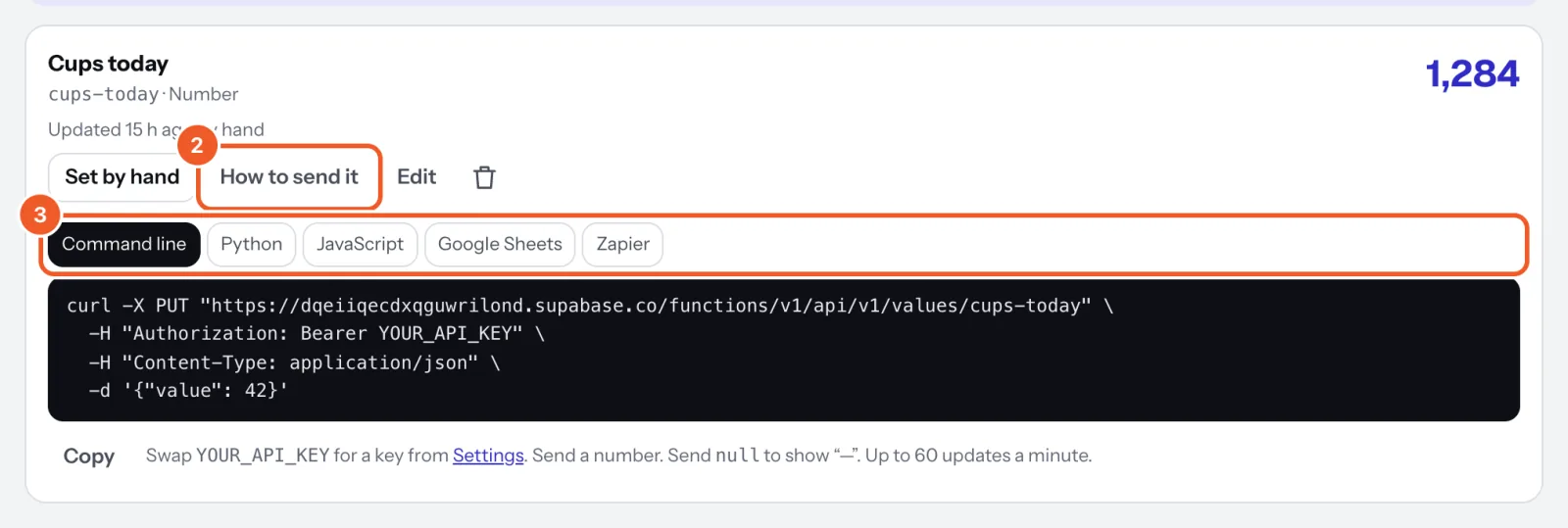
curl -X PUT https://dqeiiqecdxqguwrilond.supabase.co/functions/v1/api/v1/values/cups-today \
  -H "Authorization: Bearer dsk_YOUR_KEY" \
  -H "Content-Type: application/json" \
  -d '{"value": 1284}'
In Python:
import requests

requests.put(
    "https://dqeiiqecdxqguwrilond.supabase.co/functions/v1/api/v1/values/cups-today",
    headers={"Authorization": "Bearer dsk_YOUR_KEY"},
    json={"value": 1284},
    timeout=10,
).raise_for_status()
In JavaScript (Node 18 or later, or a browser you control):
await fetch("https://dqeiiqecdxqguwrilond.supabase.co/functions/v1/api/v1/values/cups-today", {
  method: "PUT",
  headers: {
    "Authorization": "Bearer dsk_YOUR_KEY",
    "Content-Type": "application/json",
  },
  body: JSON.stringify({ value: 1284 }),
})
What to send
- Number:
{"value": 42.5}, up to a trillion. The value’s prefix, suffix and decimal places are applied on screen. - Text:
{"value": "Lamb shoulder"}, up to 200 characters. - List:
{"value": ["Sam", "Alex"]}, up to 10 lines of 80 characters. {"value": null}shows “—”. A value can also show “—” by itself when it hasn’t been updated for a while (set in the console with Edit).
The answer is the value as stored: key, name, kind, value, prefix, suffix, decimals, stale_after_minutes, updated_at and updated_by (console, or key: and the key’s first characters). GET /values lists them all; GET /values/KEY reads one.
Errors: 400 invalid_value for the wrong type, 404 not_found for an unknown key, 429 rate_limited past 60 updates a minute. Send when the number changes, not on a timer faster than that. Screens get the new value pushed within seconds and keep showing the last one offline.
Thanks for telling us. If something’s missing, tell us what and we’ll add it.
Still stuck?
Email support@dislab.app, or send us a message. If it’s about a screen, tell us its name. We answer within one business day.