
Weather
Every planNow, the coming hours, the next days, details or a full weather station for any town, in ten designs.
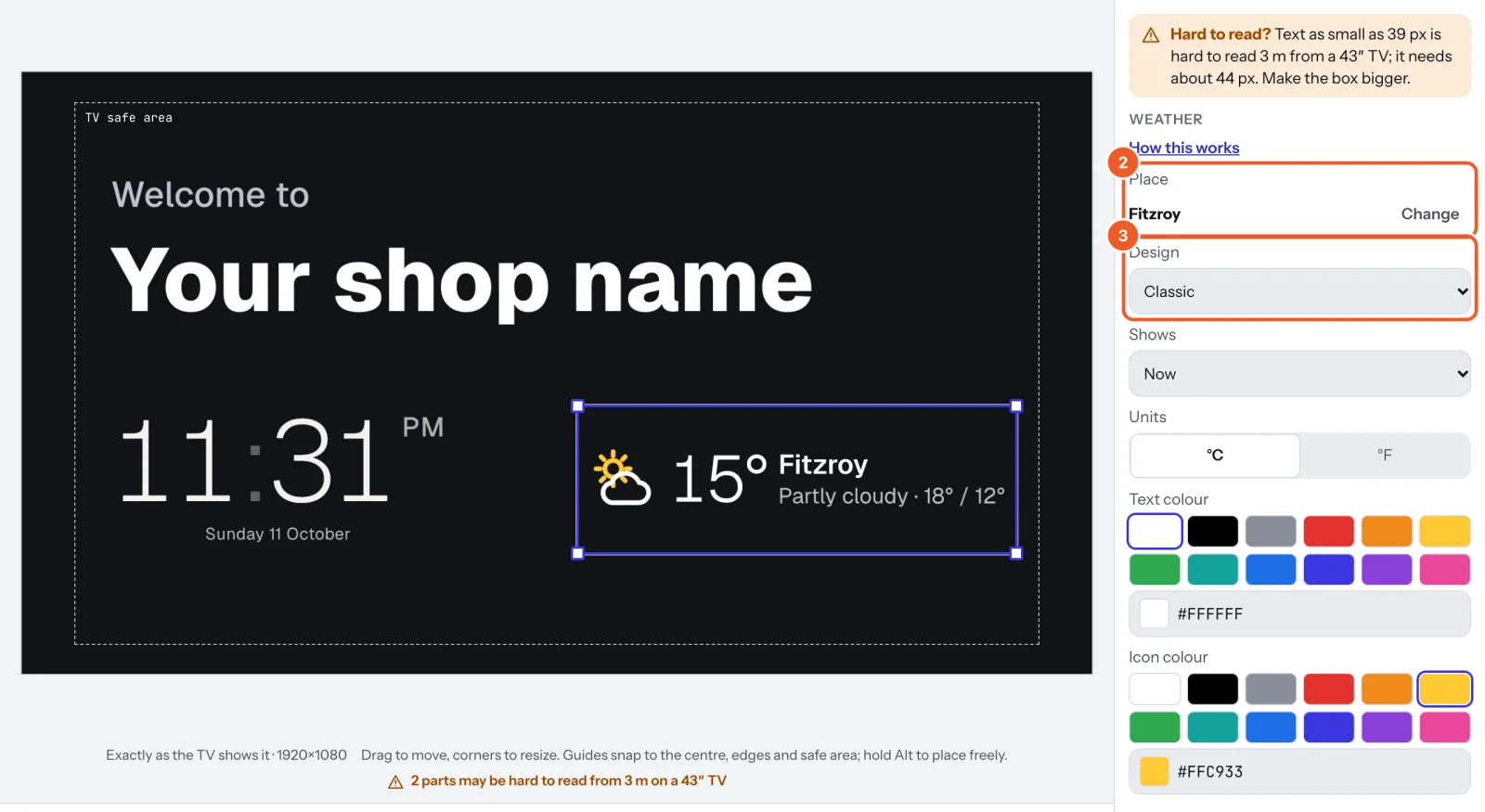
- In a sign, choose Add widget › Weather, or start from a Weather station template (Signs › Templates › Weather).
- Type the town or suburb and pick it; check the state and country beside each name. Press Change beside Place to pick another later.
- Pick a Design (ten looks, each with its own icons) and what it Shows: Now, Now and the next days, The next hours, Details (feels like, humidity, wind, UV, rain, sunrise, sunset, moon) or a Full weather station. Set Days and Hours where they apply, °C or °F, and the text and icon colours.
The weather updates about every half hour, and each design shows Live and the time it was last updated. If a screen loses the internet, after an hour it shows Offline and only the forecast; after a day the weather is taken down until it is back online.
Dislab’s server fetches the weather for your screens (the TV never does), and the source is credited on screen where it asks to be. It is for general information only; don’t rely on it for safety decisions.
Thanks for telling us. If something’s missing, tell us what and we’ll add it.
Still stuck?
Email support@dislab.app, or send us a message. If it’s about a screen, tell us its name. We answer within one business day.