
Can’t sign in
Wrong password, the browser check, too many tries, or an emailed link that doesn’t arrive.
- “That email and password don’t match.”: check the email address, then try again. Passwords are case-sensitive.
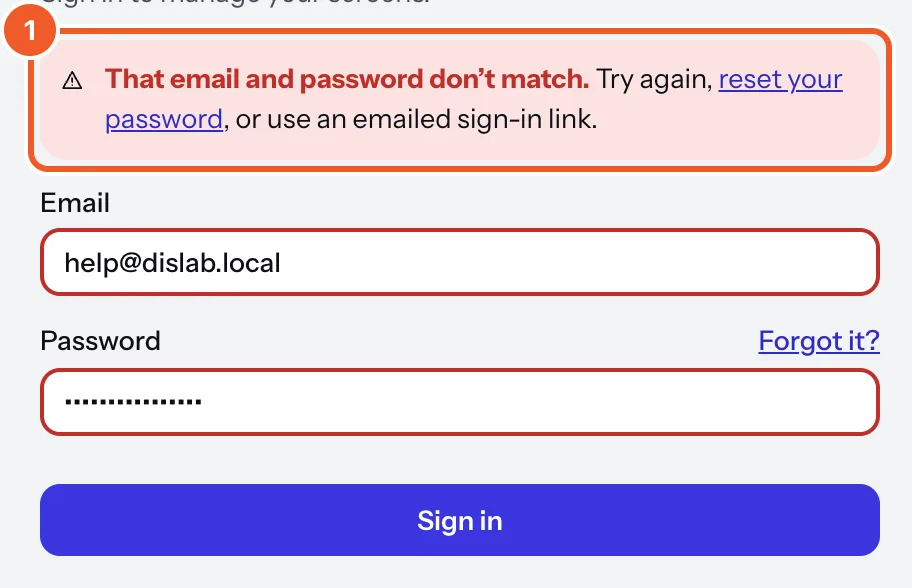
- Forgotten it? Press Forgot it? and we email a link to choose a new one (it works for 30 minutes). Or press Email me a sign-in link to sign in without a password.
- “We couldn’t check this browser. Wait a moment, then try again.”: sign-in checks you’re a person (Cloudflare’s check, under the form). Wait a few seconds for it to finish. Still failing? Turn off ad or script blockers for app.dislab.app, or try another browser.
- “Too many tries from this network. Wait a few minutes, then try again.”: too many attempts from the same internet connection. Wait, then try once, carefully.
- No email? Check spam and junk, and that it’s the address you signed up with. Links are from dislab.app. Each new link replaces the last, so use the newest.
- A link that says it has expired: links work for 30 minutes and only once. Ask for a new one.
- “Create your account first.”: you signed in, but haven’t set up a business yet. Finish creating the account.
Still can’t get in? Email support@dislab.app from the address you signed up with.
Thanks for telling us. If something’s missing, tell us what and we’ll add it.
Still stuck?
Email support@dislab.app, or send us a message. If it’s about a screen, tell us its name. We answer within one business day.