
Opening hours and holidays
Set each location’s hours, split shifts and holidays; screens use them for after hours, alerts and the calendar.
- In Locations, press Opening hours beside the location.
- For each day set when it opens and closes, or tick Closed. Another session adds a second time the same day, for a split shift (up to three).
- Copy Monday to Tuesday–Friday saves typing the same weekdays.
- Under Holidays and special days, press Add a holiday, pick the date and name it. It’s Closed all day unless you untick that and give it hours.
- Press Save.
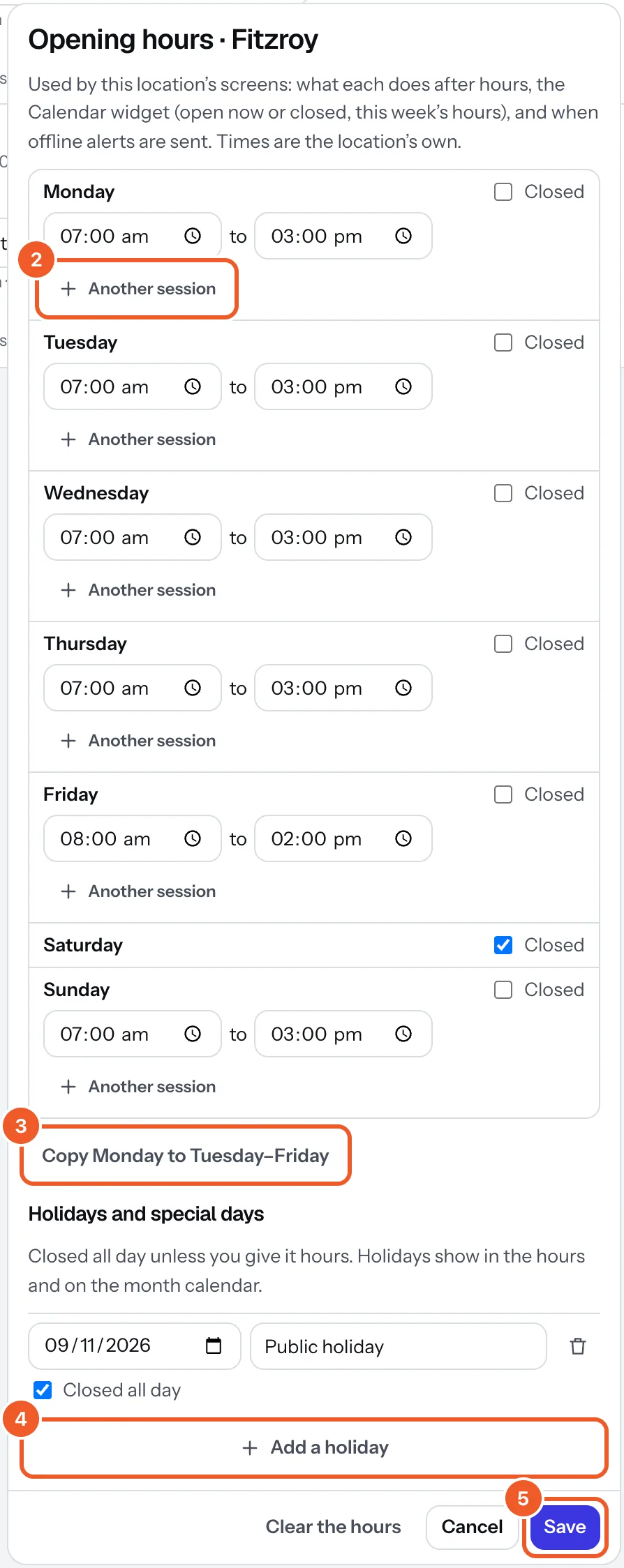
The hours are the location’s own time. They decide what each screen does after hours, what the Calendar widget shows (open now or closed, this week’s hours, holidays), and when offline alerts are sent. Clear the hours takes them off; then screens play all the time and alerts can come at any hour.
Thanks for telling us. If something’s missing, tell us what and we’ll add it.
Still stuck?
Email support@dislab.app, or send us a message. If it’s about a screen, tell us its name. We answer within one business day.