
Webhooks: events and signatures
ProDislab posts a signed JSON message to your address when a screen goes offline, a file is ready, someone joins your list, and more.
- In Settings, under Webhooks, enter your address. It must start with https:// and be on the public internet.
- Tick Every event, or untick it and choose the events you want.
- Press Add webhook.
- Copy the signing secret (
whsec_…) into your receiver now: it’s shown once. - Press Send a test. Dislab sends a
pingand says whether it arrived.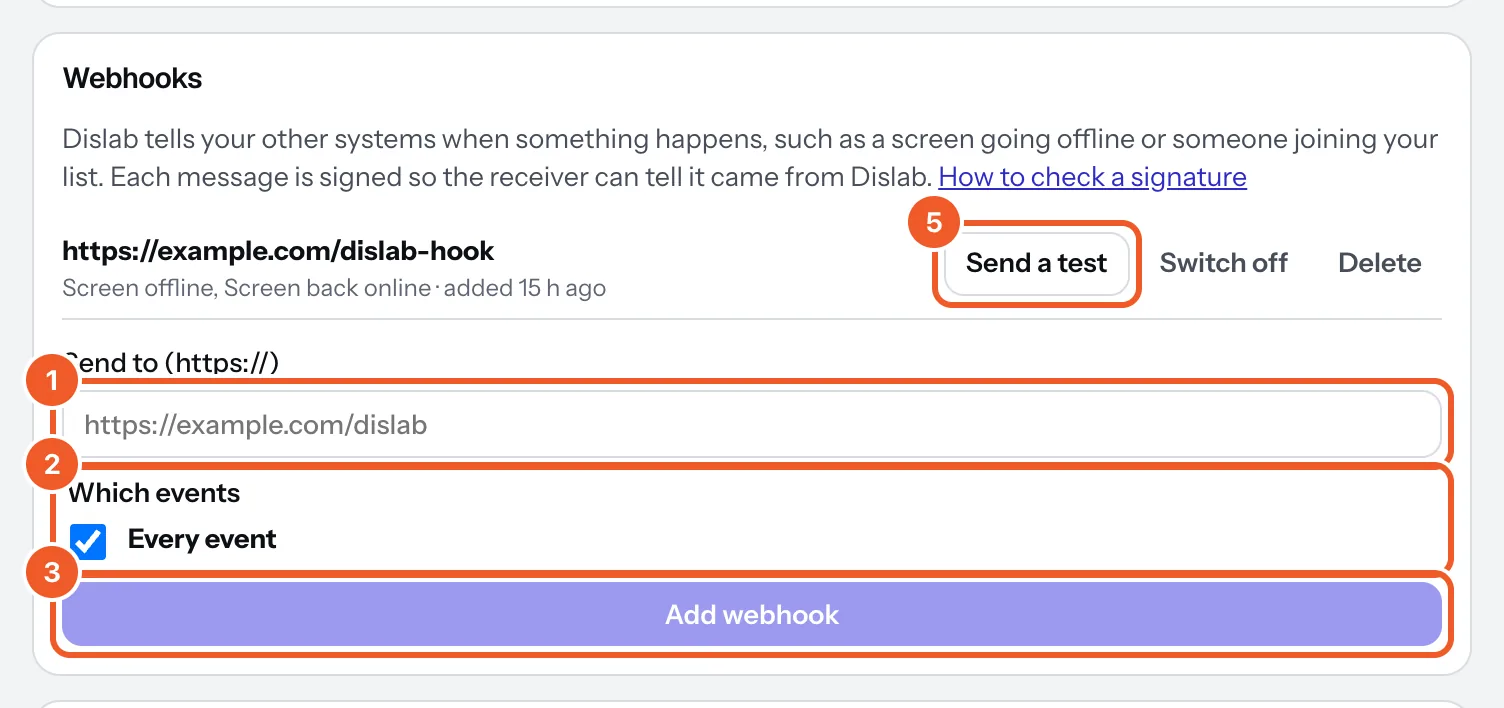
Events
screen.paired,screen.unpaired:data.screenwithid,name,location_id.screen.offline(30 minutes without checking in, while its location is open) andscreen.online:data.screen,since, anduntilwhen it’s back.screen.stuck(new content waiting an hour) andscreen.caught_up: the same fields.media.ready,media.failed:data.mediawithid,name,kind,failure_reason.contact.created: someone joined a list from a “join our list” QR code.data.contactwithid,list_id,first_name,email,mobile,consent,consent_at.ping: from Send a test only.
What arrives
A POST with Content-Type: application/json, a Dislab-Event header naming the event, a Dislab-Signature header, and:
{
  "id": "EVENT_ID",
  "type": "screen.offline",
  "created": "2026-10-11T09:30:00Z",
  "account_id": "ACCOUNT_ID",
  "data": { "screen": { "id": "...", "name": "Counter",
            "location_id": "..." }, "since": "..." }
}
Answer with any 2xx within 8 seconds. Anything else is tried again after 1, 5 and 30 minutes, then 2, 6 and 12 hours, and then given up. Each address gets its messages one at a time, oldest first. A retry has the same id, so skip ids you’ve already handled.
Checking the signature
Dislab-Signature looks like t=1791700000,v1=5f2b…. v1 is HMAC-SHA256, in hex, of t, a full stop and the raw body, keyed with your secret. Check it against the body exactly as it arrived (before parsing), and check t is within 5 minutes of now.
Node:
import { createHmac, timingSafeEqual } from 'node:crypto'

// rawBody: the request body as a string, exactly as received.
export function fromDislab(rawBody, header, secret) {
  const parts = Object.fromEntries(header.split(',').map((p) => p.split('=')))
  const t = Number(parts.t)
  if (!t || Math.abs(Date.now() / 1000 - t) > 300) return false
  const want = createHmac('sha256', secret).update(`${t}.${rawBody}`).digest('hex')
  const got = Buffer.from(parts.v1 ?? '', 'hex')
  return got.length === 32 && timingSafeEqual(got, Buffer.from(want, 'hex'))
}
Python:
import hashlib, hmac, time

def from_dislab(raw_body: bytes, header: str, secret: str) -> bool:
    parts = dict(p.split("=", 1) for p in header.split(","))
    t = int(parts.get("t", "0"))
    if abs(time.time() - t) > 300:
        return False
    want = hmac.new(secret.encode(), f"{t}.".encode() + raw_body,
                    hashlib.sha256).hexdigest()
    return hmac.compare_digest(want, parts.get("v1", ""))
Under each address, Settings shows the last message and whether it was delivered. Switch off pauses an address; Delete removes it. Up to 10 addresses.
Thanks for telling us. If something’s missing, tell us what and we’ll add it.
Still stuck?
Email support@dislab.app, or send us a message. If it’s about a screen, tell us its name. We answer within one business day.